
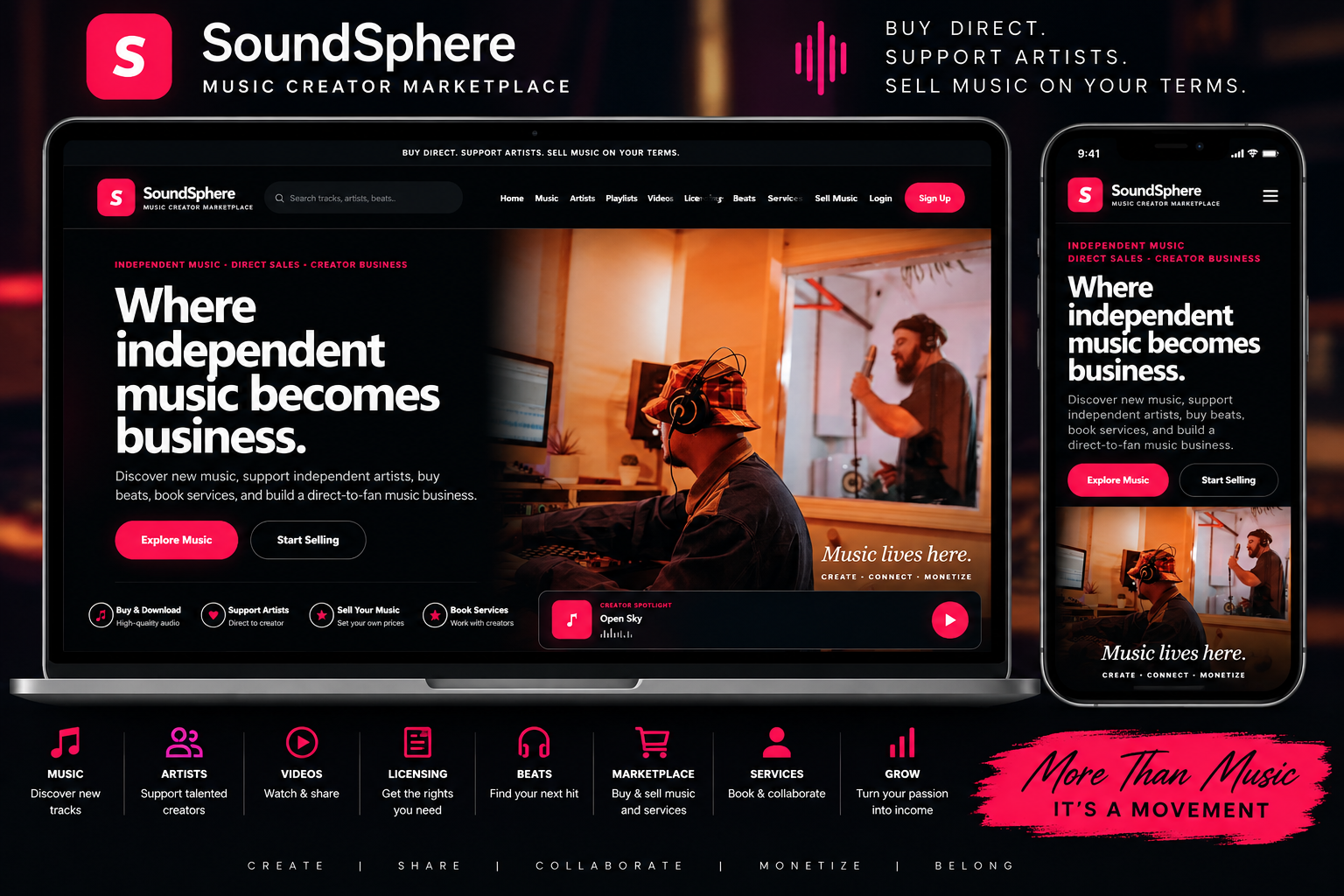

Music / Artist Marketplace
SoundSphere Music Creator Marketplace
Production-ready Smart Site 4 music creator marketplace with the approved Frontend Page Controllers dashboard, cleaned dedicated page editors, full backend controls, cache-safe admin styling, and isolated demo credentials admin / admin123.
Secure checkout
Customer account access
Re-download anytime
Features
- Multi-User Music Platform — Artists, producers, beat makers, and other creators can create their own accounts.
- Artist & Creator Login — Registered users receive their own secure login and account area.
- Music Uploads — Creators can upload and publish their own music directly to the platform.
- Sell Music Online — Artists can set prices and sell their music directly to listeners and customers.
- Stripe Payments Included — Accept secure card payments through Stripe.
- PayPal Payments Included — Give customers another convenient way to pay.
- Music Licensing — Offer licenses allowing customers, businesses, filmmakers, content creators, advertisers, and others to legally use music commercially.
- Multiple License Options — Create different licensing choices based on how a track can be used.
- Beat Marketplace — Producers can upload, promote, license, and sell beats.
- Artist Profiles — Each creator can showcase their music, information, releases, and content.
- Music Playlists — Organize tracks into playlists so visitors can discover and continuously enjoy music.
- Music Player — Visitors can preview and listen to tracks directly on the website.
- Music Discovery — Give visitors an easy way to browse and discover tracks, artists, beats, and other creators.
- Search System — Search for music, artists, beats, and other available content.
- Video Section — Creators can showcase music-related video content alongside their audio releases.
- Creator Marketplace — Sell more than songs by offering beats, licensing, music-related products, and creator services.
- Creator Services — Promote services connected to the music business from one platform.
- Multiple Sellers — The platform is designed for more than one artist instead of functioning as a website for only a single musician.
- Creator-Controlled Content — Users can manage the music and content associated with their accounts.
- Customer Accounts — Listeners and buyers can register and return to their accounts.
- Secure Digital Purchases — Customers can purchase digital music and other eligible products through the platform.
- Backend Admin Panel — The website owner receives administrative controls for managing the platform.
- Manage Users — View and manage registered platform members.
- Manage Music & Content — Control uploaded music and other platform content from the backend.
- Manage Sales & Payments — Keep the business side of the music marketplace organized.
- Change Website Name — Rebrand MuseDistrict with your own platform or company name.
- Change Logo — Upload your own logo and turn the template into your own music brand.
- Editable Website Content — Customize important wording, images, branding, and platform information.
- Custom Hero Image/Video — Give the homepage a professional music-industry presentation using your own promotional media.
- Artist Signup — Build your own community instead of depending entirely on third-party music platforms.
- Responsive Mobile Design — Artists and customers can use the platform from phones, tablets, and desktop computers.
- Mobile Navigation — Professional mobile hamburger navigation keeps the full platform accessible on smaller screens.
- Independent Music Brand — Build a standalone destination for your artists and music instead of sending your audience exclusively to another company's platform.
- Built for Growth — Start with your own music and expand into additional artists, producers, beats, licensing, videos, and services as the platform grows.
- Smart Site 4 Expandability — Extend the platform with compatible Starr Suite/Smart Site 4 add-ons as additional functionality is needed.
- One-Time Template Purchase — Own the template instead of paying a recurring template subscription fee.
About This Website Template
Production-ready Smart Site 4 music creator marketplace with the approved Frontend Page Controllers dashboard, cleaned dedicated page editors, full backend controls, cache-safe admin styling, and isolated demo credentials admin / admin123.
What the customer receivesA complete downloadable website template package intended for installation on the customer’s own hosting account. The purchase remains available in the Smart Site 4 customer account for later re-download.
How It Works
- The customer reviews the product page, screenshots, compatibility details, and live demo.
- The customer completes checkout using the existing Smart Site 4 payment system.
- After successful payment, the template appears in the customer account download area.
- The customer downloads the complete template ZIP and follows the included installation instructions.
- The customer uploads the website files to their hosting account, runs the included installer when required, and signs in to the template’s administration panel.
- The customer replaces demo content, images, contact information, payment details, and business settings with their own information.
Installation Guide
- Purchase the template and sign in to the customer account used for the order.
- Open the customer download area and download the template ZIP to a computer.
- Create a full backup of the target website and database before replacing any existing files.
- Open the hosting File Manager or FTP account and upload the template ZIP into the intended website folder.
- Extract the ZIP. Confirm that the main website files are in the correct folder and not inside an unnecessary extra directory.
- Create or select the required database if the template uses MySQL, then update the included configuration details as documented.
- Open the template’s installation page, usually
install.php, and complete the setup steps. - Sign in to the template administration panel and immediately change the default password.
- Replace demo text, images, contact information, email addresses, payment keys, and business details.
- Test navigation, forms, customer accounts, checkout, email, uploads, and mobile responsiveness before launching.
- Remove or protect the installer after setup when the included documentation instructs you to do so.
ImportantWebsite hosting, a domain, SSL, PHP, database access, payment accounts, API keys, email delivery, and third-party services are normally supplied by the purchaser unless the product description states otherwise.
Included Benefits
Complete website files
Receive the frontend, backend, assets, configuration structure, and included documentation.
Live demo preview
Review the template’s appearance and primary workflow before purchasing.
Administration panel
Manage supported content, images, products, listings, services, or settings from the backend.
Responsive design
Designed to adapt across desktop, tablet, and mobile screen sizes.
Customer account delivery
The purchased ZIP is delivered through the customer’s Smart Site 4 account.
Repeat downloads
The customer can return to the purchase history and download the template again later.
Requirements and Customer Responsibilities
- A compatible web hosting account with PHP and the database technology listed for the template.
- A domain or subdomain and a valid SSL certificate for secure customer and payment pages.
- Permission to upload files, create folders, set file permissions, and create or import a database.
- Separate accounts and credentials for Stripe, PayPal, email delivery, maps, AI, social platforms, or other third-party integrations when used.
- Replacement of all demo content, placeholder images, sample listings, contact details, and test credentials.
- Regular backups, software updates, security monitoring, privacy policies, terms, and legal compliance.
Frequently Asked Questions
Is this a hosted website service?
No. This is a downloadable website template. The purchaser installs it on their own compatible hosting account unless the listing specifically says hosting is included.
Do I receive the same website shown in the demo?
You receive the template structure and included files. Demo content may be included for presentation, but it should be replaced with the purchaser’s real business information and properly licensed media.
Where do I download the template after purchase?
After successful payment, the template appears in the customer account download area and remains available for re-download.
Does the purchase include a domain or hosting?
No, unless the product description explicitly states otherwise. Domains, hosting, SSL, email, and third-party services are normally purchased separately.
Are Stripe or PayPal credentials included?
No. The purchaser must use their own payment account and keys. Never use demo or another person’s private payment credentials.
Can the template be customized?
Yes. Supported content can be managed through the included backend, and developers may further modify the code. Custom development is separate unless specifically included.
What should I do before installing over an existing website?
Create complete file and database backups. A fresh folder or staging site is strongly recommended for testing before replacing a live website.
What if the template does not install?
Confirm the PHP version, required extensions, database credentials, file locations, permissions, upload limits, and package instructions. Use the documentation and contact support with the exact error message and screenshots.
Troubleshooting
- Blank or 500 page: Check the PHP error log, PHP version, required extensions, and configuration paths.
- Database connection error: Verify database name, username, password, host, and imported tables.
- CSS or images missing: Confirm the files were extracted into the correct folder and URL paths match the installation location.
- Uploads fail: Check folder permissions, PHP upload limits, file-size limits, and allowed file types.
- Checkout fails: Verify live or test payment keys, webhook URLs, SSL, currency, and payment settings.
- Email is not delivered: Configure authenticated SMTP or the documented mail service and test the sending address.
Related Website Templates